90 Day Job Costing Plan for Contractors to Stop Margin Leaks

90 Day Job Costing Plan for Contractors to Stop Margin Leaks
Job costing for contractors means tracking every dollar of labor, materials, equipment, subcontractor, and overhead cost against a specific job and cost code, in real time rather than after the fact. The single practice that separates profitable contractors from the ones who find out too late: running a weekly estimate versus actual comparison by cost code. Do that consistently and you catch overruns while there’s still time to fix them, instead of discovering the loss on the final invoice.
TL;DR:
- Weekly comparison of actual costs against the budget by cost code is essential to catch overruns early and prevent hidden losses.
- Precise tracking of labor burden, timely updates on change orders, and assigning costs immediately reduce margin erosion.
- Standardized cost codes organized by phase and trade ensure consistent, meaningful comparison across all jobs.
- Real-time data capture for labor, materials, and subcontractor costs is critical for effective job costing and cash flow management.
- Tightening the quoting process with detailed, locked estimates prevents scope creep and sets a solid foundation for job costing accuracy.
Table of Contents
- What Is Job Costing, and How Does It Differ From an Estimate?
- The Five Cost Buckets That Make or Break a Job
- How Do You Structure Cost Codes and Load a Budget?
- How Do You Capture Job Cost Actuals in Real Time?
- What Reports Actually Tell You a Job Is in Trouble?
- What Mistakes Quietly Eat Into Contractor Margins?
- What Should You Look for in a Job Costing Tech Stack?
- A 90-Day Plan to Actually Adopt Job Costing
- Tighten Job Costing at the Source: The Quote
- Sources
What Is Job Costing, and How Does It Differ From an Estimate?
An estimate is a prediction made once, before the work starts. A budget is that estimate loaded into a live tracking system. Job costing is the ongoing discipline of comparing what you actually spend against that budget, code by code, week by week. Confusing these three is why so many contractors think they’re “doing job costing” when they’re really just doing bookkeeping with extra spreadsheets.
Bookkeeping tells you what happened to your business overall. Job costing tells you what’s happening on Project 4022, specifically the framing line, specifically this week. That distinction matters because a company can look profitable on paper while three jobs are quietly bleeding out and one job is subsidizing the loss.
Getting this right requires clear ownership:
- Estimator builds the original cost projection using takeoffs, sub quotes, and material pricing.
- Project manager owns the budget once the job breaks ground, approving change orders and tracking scope.
- Superintendent feeds field data: labor hours, delays, material waste.
- Finance or the office reconciles actuals against budget and flags variances weekly.
Accurate estimates start with defined scope and complete documentation. Quantity takeoffs and BIM integration improve the precision of that initial number, but even a perfect estimate is worthless if nobody checks it against reality once work begins.
The Five Cost Buckets That Make or Break a Job
Every job cost rolls up into five categories, and each one carries its own tracking risk.
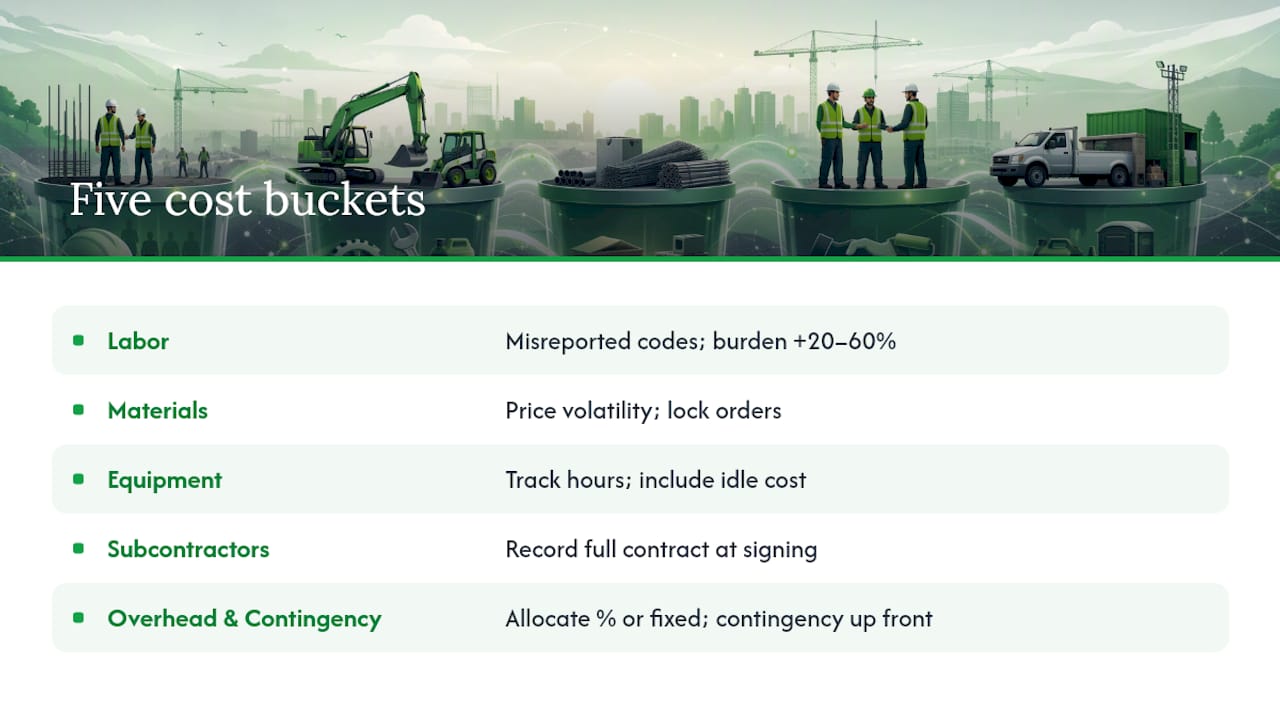
Labor is the most dangerous because it’s the easiest to misreport. A worker clocking hours to “Job 12” without specifying the cost code (framing versus punch list, for instance) makes the number technically accurate and practically useless. Labor also needs to reflect the fully burdened rate, not just the hourly wage. Burden, meaning payroll taxes, workers’ comp, benefits, PTO, and vehicle costs stacked on top of base pay, commonly runs 20% to 60% above the wage itself depending on benefits structure, workers’ comp class code, and region. A contractor budgeting labor at the raw hourly rate is underestimating true cost before the job even starts.
Materials move fast and volatile. Lock pricing at time of order where possible, assign every receipt to a job and cost code immediately (not at month end), and build escalation clauses into contracts for materials with unstable pricing, lumber and steel being the usual suspects.
Equipment costs get missed constantly because owned equipment doesn’t generate an invoice the way rentals do. Track utilization hours the same way you’d track a rental bill: hours used, hours idle, and what that idle time actually costs you in depreciation and financing.
Subcontractors need committed cost reporting, meaning you track the full contract value the moment it’s signed, not just what’s been invoiced so far. Pair that with active certificate-of-insurance tracking and line-item invoice detail so a sub’s draw request maps cleanly to your cost codes.
Overhead and contingency get allocated either as a percentage of direct costs or as a fixed line per job, and contingency should be built in at the estimate stage rather than added later as an excuse for scope creep. A dedicated contingency line, sized appropriately for project risk, protects margin without disguising real overruns as “unforeseen conditions.”
Labor burden runs 20 to 60 percent on top of base wages. A crew paid $30 an hour can cost you $36 to $48 an hour once taxes, insurance, and benefits are factored in. Budget the base wage and you’ve already lost the game before the first shovel hits dirt.
How Do You Structure Cost Codes and Load a Budget?
Standardized cost codes are the backbone of everything else in this article. Without them, “estimate versus actual” is a meaningless comparison because you’re not comparing the same buckets across jobs.
- Build a cost-code structure organized by phase and trade (site work, foundation, framing, electrical, finishes) and use the same structure on every project, not a custom set per job.
- Map every code to your chart of accounts so job costs roll up cleanly into your accounting system without manual reclassification.
- Load the budget with both hour and dollar figures for labor codes. Hours let you measure productivity; dollars let you measure cost. Skip one and you’re flying half-blind, since tracking hours and dollars together is what surfaces hidden overruns before they show up on a bank statement.
- Add separate line items for subcontractor commitments and general conditions, rather than burying them inside trade codes where they distort your labor productivity numbers.
- Run a budget kickoff checklist before mobilization: confirm contingency is set, get sign-off from the PM and finance on the baseline, and lock that baseline so later comparisons mean something.
Pro Tip: Never let field crews create their own cost codes on the fly. One superintendent’s “misc labor” bucket becomes an unrecoverable black hole by the time the job closes out.
Converting an estimate into a working budget isn’t a formality. It’s the step that turns a sales document into a management tool, and skipping straight from estimate to invoicing is exactly how contractors lose track of where the money actually went.
How Do You Capture Job Cost Actuals in Real Time?
A budget only works if actual data flows into it fast enough to act on. Weekly reporting is worthless if the underlying time and purchase data is two weeks old by the time it lands in the system.
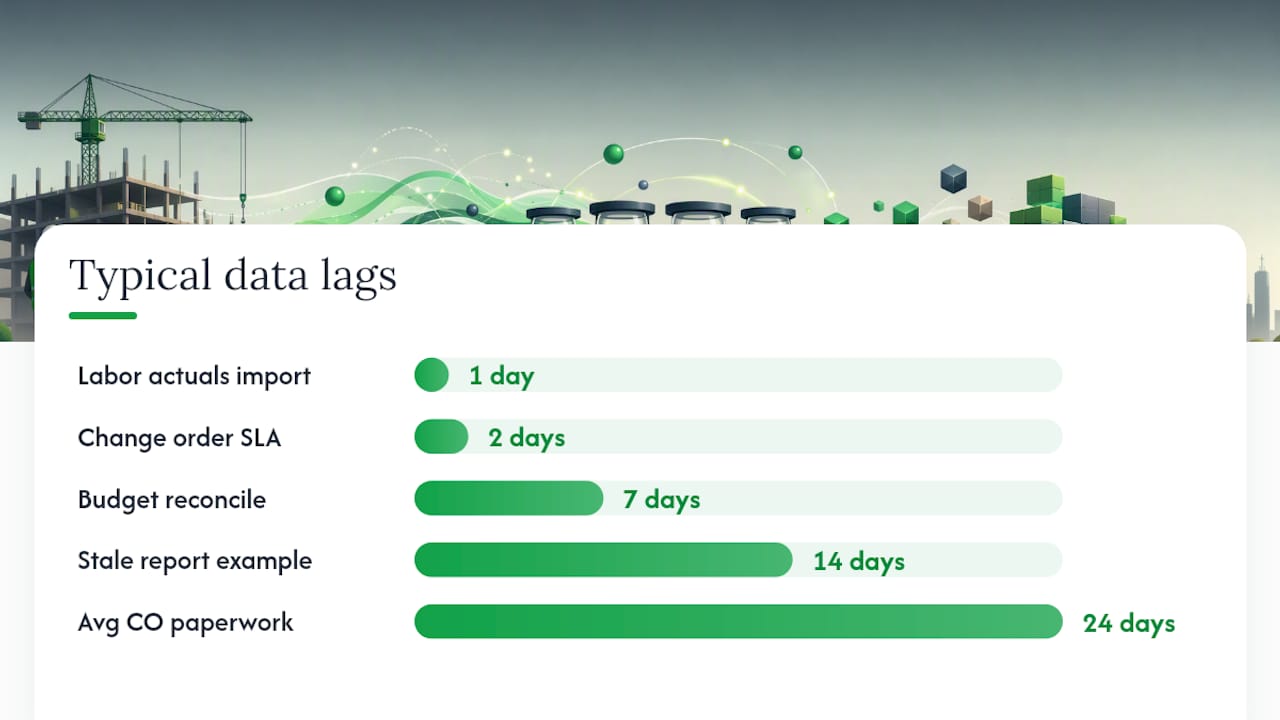
Time tracking should happen daily, tied directly to job and cost code at the point of entry, not reconstructed from memory on a Friday afternoon. The loop works like this: crews clock in against a specific code, that data exports daily, and it imports into the job cost system so labor actuals appear against budget within a day, not a pay period.
Purchase orders and receipts need to assign cost at the moment of purchase, not when the invoice arrives weeks later. A field supervisor buying lumber on a personal card and turning in the receipt three weeks later is a common way jobs look fine right up until they don’t.
Subcontractor invoices get reviewed against committed cost, with certificates of insurance verified before the first draw, not after a claim.
Retainage and work-in-progress (WIP) reporting require deliberate handling. Many popular accounting platforms, including QuickBooks Online, lack native retainage and WIP tracking without add-ons or manual workarounds, which means contractors relying on off-the-shelf software often build separate retainage schedules by hand.
Change orders are where margin quietly disappears. Contractors commonly lose an average of 24 days between a verbal CO agreement in the field and its formal documentation, and every day of that lag is a day the budget doesn’t reflect reality.
- Update the budget for an approved change order within 48 hours, no exceptions.
- Track pending change orders as a separate line so they don’t distort your current variance numbers.
- Export time daily and reconcile budgets weekly, at minimum.
Contractors lose a notable amount of time between a verbal change-order agreement and its paperwork, and that gap is where phantom scope creep hides. A 48 hour SLA for documenting and updating change orders closes most of that gap before it compounds across a dozen small changes.
What Reports Actually Tell You a Job Is in Trouble?
Four reports matter more than the rest, and running them weekly instead of monthly is what separates contractors who catch problems early from those who find out at closeout.
| Report | What it shows | Action trigger |
|---|---|---|
| Estimate vs. actual by cost code | Spend against budget, line by line | Code over 90% used before scope is complete |
| Labor efficiency ratio | Actual hours vs. budgeted hours per unit of work | Ratio trending worse than standard for two weeks running |
| Committed vs. actual | Full contract commitments vs. what’s been invoiced | Committed total exceeds remaining budget |
| Cost-at-completion forecast | Projected final cost based on current trend | Forecast exceeds original budget by any margin |
The trap most contractors fall into is reading percent-used without checking it against percent-complete. A code at 80% of budget sounds fine until you realize the work itself is only 50% done. Flagging any cost code over 90% used while the corresponding scope is incomplete is the single fastest way to catch a labor or material overrun before it’s irreversible.
Run these numbers weekly, not monthly. Weekly reviews with the PM, superintendent, and finance lead present, using real-time job costing and weekly variance tracking, consistently outperform contractors who wait for month-end close to find out something went wrong. That cadence also feeds directly into cash flow planning, since a reliable cost-at-completion forecast tells you what to bill on your next pay application before the shortfall shows up in your bank account.
What Mistakes Quietly Eat Into Contractor Margins?
Most margin loss doesn’t come from one dramatic failure. It comes from small, repeated sloppiness that compounds across a job.
- Labor charged to the wrong code, or to a generic “general labor” bucket, which makes every downstream productivity report useless.
- Change orders tracked verbally for weeks before anyone updates the budget, letting scope creep hide inside the original numbers.
- Overhead never allocated to individual jobs, so the company looks profitable while every job is technically underwater.
- Material pricing left stale from the original estimate, ignored even after a supplier has raised prices twice since bid day.
The fixes are just as concrete. Enforce cost-code discipline at time entry, no exceptions, and reject timesheets that don’t specify a code. Pull fresh quotes on your top five material categories at least quarterly. Mandate written CO documentation within 48 hours of verbal agreement, with no work proceeding on unapproved scope without a signed pending line.
Pro Tip: Add a “pending change orders” line to your weekly report, separate from approved budget. It keeps unapproved scope visible without letting it distort your current variance numbers.
What Should You Look for in a Job Costing Tech Stack?
You don’t need to name-drop specific software to know what a working system requires. Four categories matter:
- Field time apps that let crews clock in against job and cost code from a phone, with no end-of-week reconstruction.
- Purchase order and accounts payable tools that assign cost to a job at the moment of purchase, not when the invoice lands in the office.
- Accounting software with real WIP and retainage support, since generic bookkeeping platforms often need manual workarounds to handle either correctly.
- Reporting dashboards that surface estimate versus actual and labor efficiency without requiring a spreadsheet rebuild every Friday.
Evaluate any stack on data fidelity first: how fast does real field data reach the report, and how much manual re-entry happens along the way? A tool that requires double entry between field and office defeats the purpose of real-time job costing before you’ve even opened the dashboard.
A 90-Day Plan to Actually Adopt Job Costing
Here’s how I’d roll this out if I were running the pilot myself, rather than just talking about it in theory.
Weeks 1 to 2: Pick one active job as the pilot. Standardize cost codes across that job only, and get the PM and superintendent aligned on what gets logged where.
Weeks 3 to 6: Enforce daily time capture tied to job and code. No exceptions, even for the crew who’s “always done it their own way.” Run the first weekly estimate versus actual review, even if the data’s rough.
Weeks 7 to 10: Add PO and sub invoice discipline. Start tracking pending change orders as a separate line. Expect resistance here, since this is where old habits fight back hardest.
Weeks 11 to 13: Roll the process to a second job. Measure variance reduction, change order turnaround time, and whether cash flow forecasting improved. If those three numbers move in the right direction, you scale it company-wide.
— Robert
Tighten Job Costing at the Source: The Quote
Every job costing system in the world can’t fix a job that started with a vague, underpriced quote. The margin leaks this article covers, mislabeled labor, undocumented change orders, stale material pricing, often trace back to a quoting process that let scope slip before a shovel ever hit the ground. Quote-lock exists to close that gap upstream, before job costing even begins.

Quote-lock lets you build a detailed, professional quote in minutes, with automatic tax calculations and clear scope so the client agrees to exactly what you’re pricing, not a vague verbal understanding that turns into a change-order fight three weeks in. Once a client accepts, you convert that quote into an invoice with one click, no re-entering numbers, no gap between agreed scope and billed scope. Built-in view tracking and automatic reminders mean you’re not chasing signatures or wondering if a quote got lost in someone’s inbox, which keeps your pipeline of committed work, and your cash flow, moving on schedule.
If you’re a builder or renovation contractor trying to protect the margins your job costing system is designed to track, start with tighter quotes. Try Quote-lock’s construction quoting software with a free trial and see how much faster accepted work turns into cash in hand.
Sources
- Construction cost estimator: best practices for accuracy
- How to build a construction budget: from estimate to job cost control
- Job-based Budgeting - How To Protect Your Profits In 2026 - VASL
- The Complete Guide To Job Costing For Contractors