Simple Invoicing for Small Trades: Get Paid Faster

Simple Invoicing for Small Trades: Get Paid Faster
Simple invoicing cuts the time between finishing a job and getting paid. For small trades, that gap is where cash flow problems live. The three biggest immediate wins are faster payments (often same-day to two weeks instead of 30-plus days), less time on paperwork per job, and fewer billing disputes with clients.
The single step you can take today: send the invoice before you leave the job site.
- Faster payments: Contractors who invoice within 7 days get paid up to 70% faster than those who wait.
- Less admin time: Manual invoice processing costs roughly $15 per invoice and can take up to two weeks to clear.
- Fewer disputes: Clear, itemized invoices sent promptly leave less room for “I didn’t know what I was paying for.”
Pro Tip: Set a personal rule: no driving away from a job until the invoice is sent. It takes 90 seconds on a phone and removes the single biggest delay in your payment cycle.
Key Takeaways
Simple invoicing is the highest-ROI operational change most small trades can make: same-day invoicing, digital payments, and automated reminders typically cut days to payment from 34 days to under two weeks.
| Point | Details |
|---|---|
| Invoice same-day | Contractors who invoice within 7 days get paid up to 70% faster than those who wait. |
| Automate reminders | Automated reminder sequences with payment links recover overdue invoices without manual calls. |
| Reduce DSO | Digital invoicing with payment options cuts DSO from roughly 34 days to 8–14 days. |
| Know the cost | Manual processing costs ~$15 per invoice; a subscription tool typically pays back within weeks. |
| Use Quote-lock | Quote-lock converts accepted quotes to invoices in one click, with mobile invoicing and automated follow-ups built in. |
Table of Contents
- Why simple invoicing matters more for trades than most businesses
- How does simple invoicing actually improve cash flow?
- The concrete benefits: cash flow, time, accuracy, and fewer disputes
- What should you look for in invoicing tools for trades?
- How to implement simple invoicing in 5 steps
- What does simple invoicing actually cost, and when does it pay back?
- Common pitfalls that undermine a simple invoicing system
- What switching to simple invoicing actually feels like
- Quote-lock makes quoting and invoicing faster for busy trades
- Sources
Why simple invoicing matters more for trades than most businesses
Trades work differently from a subscription business or a retail store. Every job is a one-off event with its own materials list, labor hours, and often last-minute variations. That structure creates natural friction in billing. A plumber who finishes a job at 4 PM on a Friday, then tries to reconstruct the materials used and hours worked on Monday morning, is already fighting a losing battle against memory, missing receipts, and a client who has moved on mentally.
Cash flow sensitivity is sharper in trades than in most small businesses. You pay for materials upfront, often before the client pays a cent. Margins on labor are tight. A single slow-paying client on a $4,000 job can mean you’re personally covering the cost of materials for the next job out of pocket. That’s not a cash flow inconvenience; it’s a real operational risk.
The administrative drag is also underestimated. Trades that rely on manual invoicing typically spend time on:
- Reconstructing job details from memory or paper notes after the fact
- Chasing clients by phone when invoices go unpaid
- Re-entering data from field notes into a spreadsheet or accounting software
- Correcting errors on invoices that were built from scratch each time
Each of those tasks is invisible overhead. It doesn’t show up as a line item, but it adds up fast across a week of jobs.
Pro Tip: The highest-impact habit change isn’t software. It’s timing. Invoice the same day the job is done, even if it’s a rough invoice you refine later. Same-day invoices get paid faster than any other single variable.
How does simple invoicing actually improve cash flow?
The evidence on this is consistent. Contractors who send invoices within 7 days of job completion get paid up to 70% faster than those who delay. That’s not a marginal improvement; it’s the difference between a 10-day payment cycle and a 30-day one.
On the cost side, manual invoice processing runs about $15 per invoice in labor and overhead, according to DocuClipper research cited in industry analyses. For a contractor sending 20 invoices a month, that’s $300 in hidden admin cost every month, before accounting for the time spent chasing late payments.
The timeline for seeing improvements after switching to a simpler system tends to follow a predictable pattern:
- Same day: First invoices go out faster; clients receive a professional, itemized document instead of a handwritten note or delayed email.
- Within 7 days: Payment requests with embedded payment links start getting settled before the client forgets or deprioritizes them.
- Within 30 days: Days sales outstanding (DSO) drops noticeably. Automated invoicing with digital payment options has been shown to reduce DSO from roughly 34 days to 8–14 days in contractor surveys. Same-day mobile payments compress the cycle further.
On recordkeeping: the IRS accepts electronic accounting records for small businesses, including digital invoices stored in accounting software. You don’t need paper files. A properly stored digital invoice in your invoicing platform or accounting software counts as an acceptable record for tax and audit purposes, provided it’s accurate, complete, and retrievable.
The Federal Reserve’s 2024 small business payments report documents that forgetfulness and payment friction (paper invoices, check-only options) are among the leading causes of late payments. Digital delivery and one-click payment links address both directly.
The concrete benefits: cash flow, time, accuracy, and fewer disputes
Cash flow and days sales outstanding
Reducing DSO from around a month to under two weeks increases working capital availability significantly, benefiting cash flow. That covers materials for the next job without touching a credit line.
Admin time and data accuracy
A weekly 10-minute admin routine combined with digital templates can cut paperwork time significantly for small trades. When invoices are built from a template that auto-populates client details, job descriptions, and tax calculations, the risk of a missed line item or a wrong total drops sharply. That matters because unbilled materials are pure lost revenue.

Revenue capture
Manual invoicing often means forgotten line items. A plumber who installs three extra fittings and forgets to add them to the invoice has effectively donated that material to the client. A digital invoice built from a job record captures everything entered during the job, not just what you remember at the end of the day.
Professionalism and dispute reduction
A clear, itemized invoice with a payment link, sent within hours of job completion, signals professionalism and removes the most common dispute trigger: the client who claims they “didn’t know” what they were being charged for. Immediate invoicing with clear content is consistently cited as the most effective way to reduce payment disputes in small trades.
Consider a solo electrician running five jobs a week. Switching from handwritten invoices sent days later to same-day digital invoices with itemized labor and materials reduced his average payment time from 28 days to 9 days. That’s not a hypothetical outcome; it’s the kind of result the DSO data above predicts.
| Metric | Before simple invoicing | After simple invoicing |
|---|---|---|
| Average days to payment (DSO) | ~34 days | 8–14 days |
| Manual processing cost per invoice | ~$15 | Reduced with automation |
| Invoice disputes per month | Higher (missing details) | Lower (itemized, immediate) |
| Admin time per invoice | 15–20 min (manual) | 2–5 min (template-based) |
What should you look for in invoicing tools for trades?
Not every invoicing tool is built for field work. A solo plumber doesn’t need a full enterprise accounting suite. The features that actually move the needle for trades are specific.
Mobile-first invoicing is non-negotiable. If you can’t create and send an invoice from your phone on the job site, the tool won’t change your payment timing. Look for apps that work on iOS and Android without requiring a laptop.
Quote-to-invoice conversion saves the most time for trades that quote before starting work. When an accepted quote converts to an invoice in one click, you eliminate re-entry, reduce errors, and maintain a clean paper trail from estimate to payment. Free invoice templates built for trades give you a starting point that already includes the right fields.
Deposit and progress invoicing matters for larger jobs. Collecting 30–50% upfront before materials are purchased shifts the cash flow risk back to the client where it belongs.
Automated reminders with payment links are the single most effective tool for recovering overdue invoices without making awkward phone calls. Automated reminder sequences with embedded payment links recover a significant share of overdue balances, according to platform data cited in contractor invoicing analyses.
Accounting integrations (QuickBooks, Xero) and exportable records keep your bookkeeper or tax preparer happy and reduce year-end scrambling. PDF invoices are the practical standard for universal formatting and audit readiness.
Pro Tip: Prefer tools that require zero training for your clients and minimal training for your technicians. If a client needs to create an account to pay an invoice, you’ve added friction that will cost you days. One-click payment links are the standard to aim for.
A quick comparison of what matters by business size:
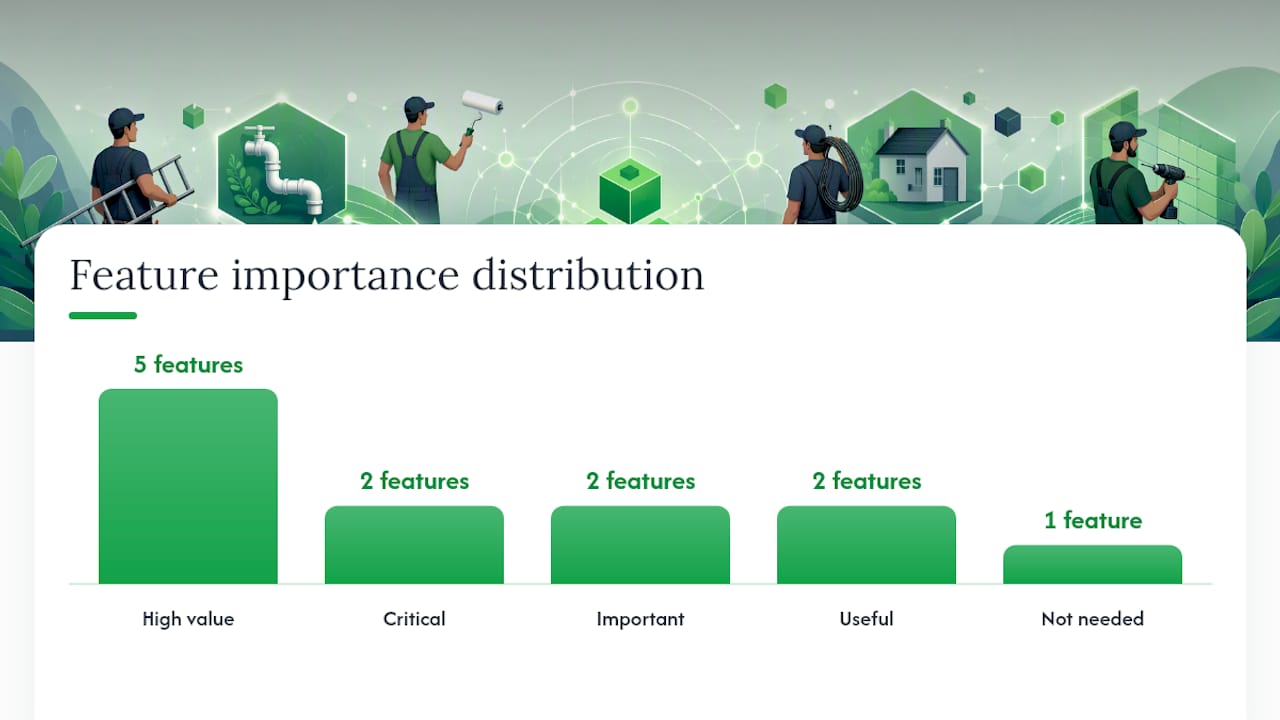
| Feature | Solo operator | Small team (2–5 techs) |
|---|---|---|
| Mobile invoicing | Critical | Critical |
| Quote-to-invoice | High value | High value |
| Automated reminders | High value | High value |
| Team management | Not needed | Important |
| Accounting export | Useful | Important |
| Deposit invoicing | Useful | High value |
How to implement simple invoicing in 5 steps
Getting from manual chaos to a working system doesn’t require a weekend project. Five focused steps cover it.
- Pick a template and lock it in. Choose one invoice template for trades that includes all required fields: your business name and address, client details, job description, itemized labor and materials, tax, payment terms, and due date. Use it for every job, no exceptions.
- Set payment terms upfront. Net 7 or Net 14 works better for trades than Net 30. State the terms on the invoice and mention them verbally when quoting. Clients who know the terms before the job starts pay faster than those who see them for the first time on the invoice.
- Enable mobile invoicing. Configure your tool so you can send an invoice from your phone. Test it on a real job before rolling it out to your whole schedule.
- Collect a deposit on jobs over a threshold. Pick a dollar amount (many trades use $500 or $1,000) above which you require a 30–50% deposit before starting. This covers materials and filters out uncommitted clients.
- Activate automated reminders. Set a reminder sequence: a friendly nudge at 3 days past due, a firmer follow-up at 7 days, and an escalation at 14 days. Most platforms let you configure this once and forget it.
For teams, run a pilot on one technician’s jobs for a week before rolling out to everyone. Collect feedback on what slowed them down. Designate one person as the internal point of contact for invoicing questions.
Pro Tip: Keep a simple governance rule: every job gets an invoice within 24 hours of completion, no exceptions. Post it somewhere visible in your van or office. Rules that require no judgment are the ones that actually get followed.
A note on legal compliance: U.S. invoices should include your business name, address, and tax ID (if applicable), the client’s details, a clear description of services, the amount, applicable sales tax, and payment terms. The IRS guidance on electronic records confirms that digital invoices stored in accounting software satisfy recordkeeping requirements for tax purposes.
What does simple invoicing actually cost, and when does it pay back?
Most invoicing tools for trades follow a subscription model with an added payment processing fee when clients pay online. Subscriptions typically run from around $20/month for a solo operator to $50–$100/month for a small team, depending on features and user count.
Example payback calculation
Solo operator, 15 invoices/month:
- Current manual cost: 15 invoices × $15/invoice = $225/month in admin time
- Subscription cost: ~$25/month
- Net monthly saving: ~$200/month in admin time alone
- Payback period: under 2 weeks, before accounting for faster payments
Small team, 5 technicians, 60 invoices/month:
- Current manual cost: 60 × $15 = $900/month
- Subscription cost: ~$75/month
- Net monthly saving: ~$825/month in admin time
- DSO improvement (34 days to 14 days on $50,000/month revenue): ~$33,000 in additional working capital
| Scenario | Monthly invoices | Admin cost saved | Subscription cost | Net monthly benefit |
|---|---|---|---|---|
| Solo operator | 15 | ~$225 | ~$25 | ~$200 |
| Small team (5 techs) | 60 | ~$900 | ~$75 | ~$825 |
Hidden costs to watch for:
- Per-transaction fees on card payments (2–3% per invoice paid online)
- Setup or onboarding fees on some platforms
- Costs for additional users beyond the base plan
- Time spent migrating existing client data into a new system
The transaction fees are real, but they’re offset by the speed gain. A client who pays by check in 35 days costs you the equivalent in carrying costs and admin follow-up.
Common pitfalls that undermine a simple invoicing system
Getting the system wrong is easier than it sounds. These are the mistakes that show up most often.
Over-complicating the tool choice. A full job management suite with scheduling, CRM, payroll, and invoicing is overkill for a two-person electrical business. The more features a tool has, the longer adoption takes and the more likely technicians are to skip steps. Compare a dedicated quoting and invoicing tool against a full platform before committing.
Skipping automated reminders. Sending an invoice and then waiting is the most common reason invoices go unpaid. Clients get busy. A reminder with a direct payment link, sent automatically, removes the friction that causes most late payments. Turning this feature off (or never turning it on) is a costly omission.
Noncompliant invoice fields. Missing your business address, tax ID, or a clear description of services can create problems at tax time and gives clients an easy excuse to delay payment (“I need more detail before I can process this”). Use a template that includes every required field by default.
Weak security practices. Invoicing tools store client names, addresses, payment details, and job histories. Using a shared password, skipping two-factor authentication, or sending invoices over unencrypted email exposes that data. Use a platform with encrypted payment links and enable 2FA on your account.
Pro Tip: Before committing to any invoicing tool, send yourself a test invoice and pay it. If the payment process takes more than 30 seconds or requires your client to create an account, find a different tool.
Red flags when evaluating a tool or process:
- No mobile app or mobile-optimized interface
- Clients must log in to view or pay invoices
- No automated reminder feature
- No PDF export or accounting integration
- No deposit or partial payment support
What switching to simple invoicing actually feels like
The paperwork side of running a trade business is the part most tradespeople like least. It’s the end-of-day task that gets pushed to tomorrow, then to the weekend, then to “whenever I get a chance.” That delay is where cash flow problems start.
When a handyman switches from emailing PDF invoices built in Word to a mobile invoicing tool, the first thing that changes isn’t the software. It’s the habit. Sending an invoice from the job site, while the client is still standing there, feels different from doing it later. Clients often pay on the spot or within hours, simply because the payment link is right there and the job is fresh in their mind.
The time saving tends to show up in the second week. A solo operator handling 15 jobs a week who cuts invoice creation from 15 minutes to 3 minutes saves two hours a week. That’s two hours back on the tools, or two hours of rest.
For teams, the fastest path to adoption is picking one technician who’s comfortable with phones and letting them run the new system for a week. Their experience becomes the training for everyone else.
Pro Tip: Designate a “champion” on your team — the technician who figures out the tool first and becomes the go-to person for questions. Peer-to-peer adoption is faster and stickier than any formal training session.
Quote-lock makes quoting and invoicing faster for busy trades
Trades that want faster payments without adding admin complexity have a direct path with Quote-lock’s invoicing software. You create a quote in minutes using voice-driven input or a branded template, send it for online acceptance, and convert it to an invoice in one click when the job is done. No re-entry. No chasing paper.
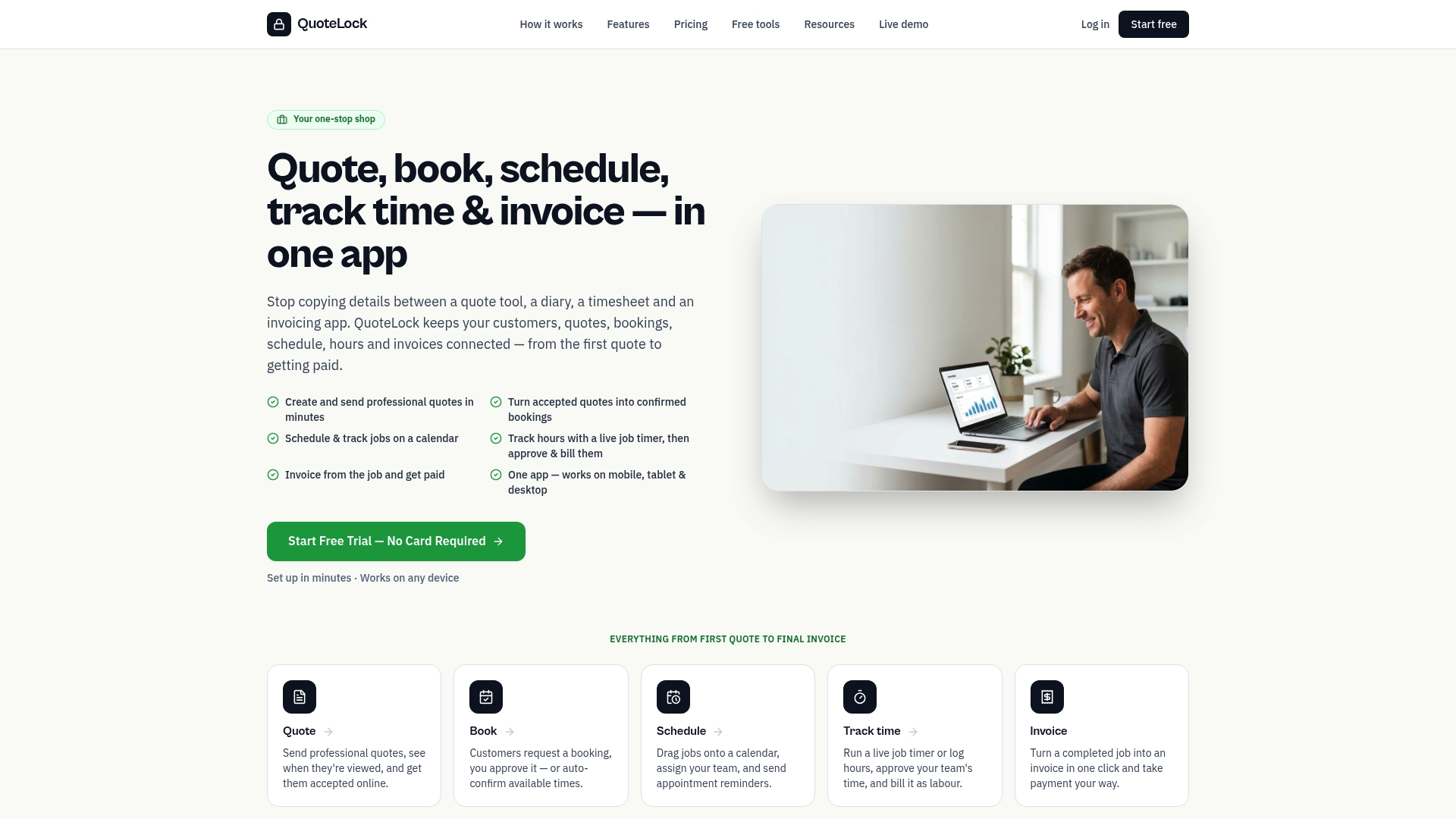
The features that matter most to trades are all there: mobile invoicing from the job site, automatic tax calculations, deposit links, progress invoicing for larger jobs, automated payment reminders, and a client management system that keeps every job’s history in one place. Accounting export keeps your bookkeeper and tax records clean without extra work.
- Send professional invoices from your phone before leaving the job site
- Convert accepted quotes to invoices without re-entering a single line
- Collect deposits upfront with a payment link clients can use in seconds
- Let automated reminders handle overdue follow-ups so you don’t have to
- Export clean records for QuickBooks, Xero, or your accountant at tax time
Quote-lock runs on a 7-day free trial with no credit card required. Start your free trial and send your first invoice today, or grab a free invoice template to get started immediately.
Sources
These are the primary sources behind the claims in this guide. All focus on U.S. guidance and industry research.
- Use of electronic accounting software records: Frequently asked questions and answers | Internal Revenue Service
- 2024 report on payments | Federal Reserve Bank small business research
- Get Paid 2x Faster With Automated Invoicing Guide | US Tech Automations
- Invoice Like A Pro: The Small Business Guide | Small Biz Finance Guide