Top Time Wasters for Tradespeople (and How to Fix Them)

Top Time Wasters for Tradespeople (and How to Fix Them)
Poor logistics, fragmented admin, and constant interruptions are the biggest common time wasters for tradespeople — and most of them are fixable this week. Arriving on site without the right parts, chasing unpaid invoices between jobs, and fielding phone calls mid-task can quietly drain two to four billable hours from a workday before lunch. Research on sole traders and small trades businesses estimates that avoidable admin alone runs 5–10 hours per week for many operators, and a separate survey analysis found workers average 18 hours per week in meetings, with roughly a third of that time considered skippable.
The top time wasters to target first:
- Missing parts or materials on arrival — build a pre-job kit checklist and confirm stock the evening before
- Fragmented admin (quoting, invoicing, chasing payments) — batch it into one 30-minute window per day
- Unnecessary meetings and briefings — replace most with a brief written update sent to the whole crew
- Constant phone interruptions — set scheduled access windows and let voicemail handle the rest
- Waiting on materials, inspections, or other trades — stage materials 24 hours ahead and confirm inspection slots in writing
- Inefficient routing between jobs — cluster same-area jobs on the same day and plan the route the night before
- Rework from miscommunication — confirm scope in writing before starting; never rely on a verbal brief alone
Pro Tip: Before you change anything, track where your time actually goes for five working days. Write start and end times for every task, including phone calls and driving. The pattern will surprise you.
Key Takeaways
The fastest way to recover billable hours is to fix the system around the worker — logistics, communication, and admin — before targeting individual habits.
| Point | Details |
|---|---|
| Logistics cause the most waste | Medium- and long-term disturbances (staging, sequencing, supplier delays) account for the largest share of nonvalue-adding time on site. |
| Admin adds up fast | Sole traders commonly lose 5–10 hours per week to fragmented quoting, invoicing, and payment chasing — most of it recoverable by batching. |
| Single-channel communication | Consolidating job information into one official channel can recover 30–60 minutes per day for foremen and supervisors. |
| Narrow arrival windows reduce no-shows | Field service data shows no-show rates run 20%–40% without reminders; a two-hour window plus layered reminders cuts that materially. |
| Quote-lock reduces admin overhead | Quote-lock’s one-click quote-to-invoice conversion, automatic reminders, and mobile quoting directly address the top admin time wasters for tradespeople. |
Table of Contents
- What are the most common time wasters on a job site?
- Why do logistics and missing preconditions waste the most time?
- How can you reclaim billable hours with faster admin and tool workflows?
- What does a practical daily routine look like for a trades crew?
- What actually moves the needle on a job site
- Quote-lock cuts the admin drain so you can stay on the tools
- Sources
What are the most common time wasters on a job site?
Most tradespeople know they’re losing time. Fewer know exactly where. Here are the ten biggest culprits, how each one shows up on site, and what to do about it.
1. Personal smartphone and social media use
A quick check of a notification turns into ten minutes of scrolling. Multiply that by six interruptions a day and you’ve lost an hour. The fix is structural, not motivational: put the phone on Do Not Disturb during work blocks, use a separate work number for client calls, and keep personal apps off the work device entirely.
2. Interruptions and task switching
Every time someone pulls you off a task, you don’t just lose the minutes of the interruption. Cognitive research from the APA shows that switching between tasks increases error rates and reduces overall output, because the brain needs time to re-engage with the original task. A foreman fielding questions every 15 minutes never gets into a productive rhythm. Designate a crew member as the first point of contact for on-site questions, and hold your own focus time sacred.
3. Working without a clear plan or job brief
Arriving on site without confirmed access, a signed scope, or the right permit wastes everyone’s time. The crew stands around, the client gets frustrated, and you burn fuel driving back. A one-page pre-job checklist — parts, tools, permit, access contact, site photos — takes five minutes to complete and prevents a half-day loss.
4. Unnecessary meetings and poorly run briefings
Most job-site meetings run longer than they need to and cover information that could have been a text message. A five-minute morning huddle with a clear agenda beats a 45-minute meeting that drifts. For anything that doesn’t require a real-time decision, a written update sent to the group works just as well and takes less time for everyone involved.
5. Admin delays: quoting, invoicing, and approvals
Quoting a job while parked outside the next one, chasing an invoice that should have been sent three days ago, waiting for a client to approve a change order — these tasks feel small but stack up fast. Batching all admin into one daily window (say, 5:00–5:30 PM) stops the constant context-switching. Using free invoice templates and mobile quoting tools cuts the time per task in half.
6. Equipment and tool downtime
A dead drill battery, a missing impact driver, a generator that hasn’t been serviced since last spring — tool failures on site are almost always preventable. A weekly five-minute van check (batteries charged, consumables stocked, tools accounted for) costs less time than a single trip back to the shop.

7. Procrastination and perfectionism
Perfectionism on a finish carpenter’s detail work is a feature. Perfectionism on a standard rough-in is a time drain. Know which tasks have a defined acceptable standard and hit it, then move on. Procrastination usually signals either an unclear next step or a task that hasn’t been broken down small enough — fix the task definition, not your motivation.
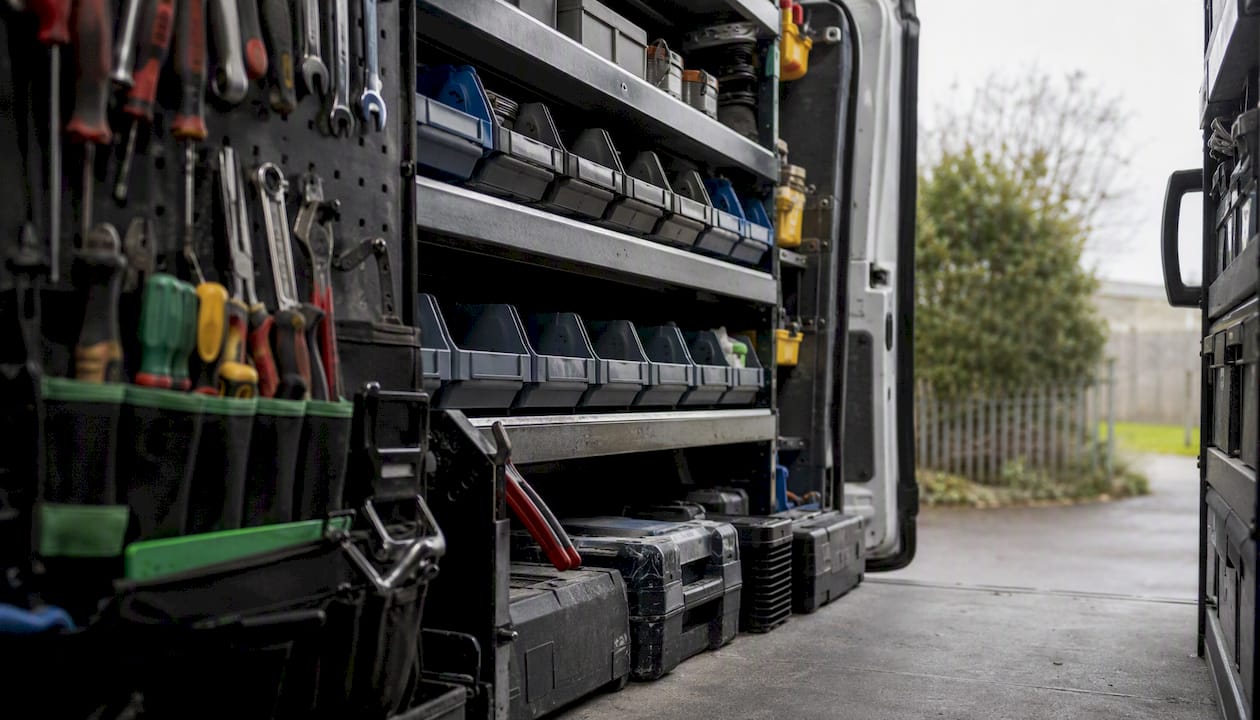
8. Searching for tools, materials, or documents on site
A foreman who spends 20 minutes hunting through a job-site trailer for a spec sheet is not an unusual story. Fragmented records across multiple channels force expensive search-and-repeat work. Assign a fixed location for every tool category in the van, keep all job documents in one folder (digital or physical), and never let a spec sheet live only in someone’s email inbox.
9. Waiting for materials, inspections, or other trades
Waiting is the most passive time waster on this list and one of the hardest to eliminate completely. What you can control: order materials with a 24-hour buffer, confirm inspection slots in writing the day before, and sequence your schedule so another task is always ready to fill a gap. Never plan a day where the only work depends on a delivery that hasn’t arrived yet.
10. Travel between jobs and inefficient routing
Driving across town to a 30-minute job, then back across town to another, is a routing problem. Cluster jobs by geography on the same day. Use Google Maps or a basic route-planning app to sequence stops before you leave in the morning. Practical trade guidance consistently identifies route planning and job clustering as two of the fastest ways to recover billable hours with no additional cost.
Pro Tip: Batch your callbacks and supplier calls into one 15-minute window mid-morning. Answering calls one at a time throughout the day costs you the mental reset each time.
Why do logistics and missing preconditions waste the most time?
Most tradespeople assume their biggest time losses come from personal habits — the phone, the slow start, the long lunch. The field data tells a different story.
Construction productivity research identifies three distinct disturbance clusters that drive nonvalue-adding time on site. Short-term disturbances last seconds to minutes and include micro-interruptions like a missing fastener or a brief tool search. Medium-term disturbances run minutes to hours and typically involve movement, transportation, and waiting for materials or a connecting task. Long-term disturbances span days or weeks and stem from design changes, supplier failures, or schedule conflicts between trades. Medium- and long-term disturbances account for the largest share of wasted time, because they don’t just pause work — they break the entire production sequence.
| Disturbance type | Duration | Main waste sources | Who is most affected | Key fix |
|---|---|---|---|---|
| Short-term | Seconds to minutes | Missing fasteners, tool searches, micro-interruptions | Individual workers | Pre-task kitting, fixed tool locations |
| Medium-term | Minutes to hours | Movement, transport, waiting for materials or next task | Crews and foremen | On-site kitting, workspace layout, takt planning |
| Long-term | Days to weeks | Design changes, supplier delays, trade sequencing conflicts | Project managers, supervisors | Design management, supplier coordination, schedule buffers |
The practical implication: fixing your personal phone habits won’t recover much time if your crew is regularly waiting 90 minutes for a material delivery that should have been staged the day before. The highest-ROI fixes target the medium- and long-term clusters first.
For short-term disturbances, prefabrication and pre-task assembly work well. Kit each task before the crew starts — every fastener, fitting, and tool in a labeled tray or bag. The trip to the van drops from six times a day to once.
For medium-term disturbances, on-site kitting combined with a tighter workspace layout reduces movement. Takt-based production control (assigning specific zones and time windows to each trade) prevents the “waiting for the other guy” problem that stalls entire crews.
For long-term disturbances, the fix is upstream: tighter design management, confirmed supplier lead times, and a schedule that builds in buffer days rather than assuming everything arrives on time.
Pro Tip: Run a 15-minute “pending review” every Friday afternoon. Go through every open job: what’s missing, what’s waiting on a supplier, what needs a design decision. Clearing those blockers before Monday morning is worth more than any productivity app.
How can you reclaim billable hours with faster admin and tool workflows?
Admin is the time waster most tradespeople underestimate, because it’s spread across the day in small doses. A quote here, a follow-up call there, an invoice at 9 PM — it never feels like a big block of lost time until you add it up. Practical trades guidance puts the real cost at 5–10 hours per week for many sole traders, most of it recoverable with a few structural changes.
Admin fixes you can implement this week:
- Set one daily admin window (30–45 minutes, same time every day) and do all quoting, invoicing, and email in that block
- Use saved quote and invoice templates so you’re filling in variables, not writing from scratch each time
- Turn on automatic invoice reminders so you’re not manually chasing payments
- Convert accepted quotes to invoices in one click rather than rebuilding the document
- Keep a mobile quoting app on your phone so you can send a quote from the client’s driveway before you drive away
Tool and equipment workflows:
- Run a weekly van-stock checklist every Friday: batteries charged, consumables restocked, tools signed back in
- Keep a “critical spares” tray in the van — common fasteners, fuses, blades, and connectors that cause the most site delays when missing
- Schedule preventive maintenance for power tools and equipment on a calendar, not when something breaks
- Store all job documents (specs, permits, photos, client contacts) in a single digital folder accessible from your phone
For customer and job records, centralizing everything in one place means you stop hunting through texts, emails, and paper folders every time a client calls with a question.
Pro Tip: Track your admin in 15-minute intervals for two weeks — note start time, task, and end time for every admin activity. Most tradespeople discover they’re spending 90+ minutes per day on fragmented admin they didn’t realize was happening. That data is what makes the case for batching.
What does a practical daily routine look like for a trades crew?
The single biggest structural change a crew can make is starting and ending every day with a short, fixed routine. It sounds obvious. Most crews don’t do it consistently.
The daily routine in brief: A 5–10 minute pre-start huddle confirms the day’s jobs, who’s doing what, and whether every kit is loaded. A midday admin batch handles any quotes or callbacks that came in during the morning. An end-of-day closeout takes five minutes: stock check, site photos, tomorrow’s kit list confirmed.
Pre-start checklist (print and clip to the van clipboard)
- Confirm today’s job addresses and access contacts
- Check that all parts and materials for each job are loaded
- Verify tools are in the van and batteries are charged
- Confirm any permits, access codes, or key pickups needed
- Check that the client has been reminded of the arrival window
- Review any open items from yesterday (callbacks, pending approvals)
End-of-day closeout
- Restock consumables used today
- Charge all batteries overnight
- Take site photos for any in-progress jobs
- Log any materials needed for tomorrow and order if necessary
- Send any outstanding quotes or invoices from today’s work
- Note any pending items (waiting on inspection, supplier, design decision)
Daily huddle protocol (5–10 minutes)
Keep it standing, keep it timed. Cover three things only: what’s on today, who owns what, and what’s blocked. Anything that needs a longer conversation gets scheduled separately — it doesn’t happen in the huddle.
Weekly pending review (15 minutes, Friday afternoon)
Go through every open job. Flag anything waiting on a supplier, a design decision, an inspection, or a client approval. Assign a follow-up action and an owner. Clear the blockers before Monday.
Handling incoming calls during a job
Set a voicemail message that tells callers when you return calls (e.g., “I return all calls between 12:00 and 12:30 PM and after 5:00 PM”). Check messages at those windows only. Field service data shows that no-show rates run between 20% and 40% when appointment reminders are absent — sending a reminder the day before and a two-hour arrival window the morning of the job cuts that sharply. That same principle applies to your own schedule: narrow windows and advance confirmation mean fewer wasted trips.
Pro Tip: For client arrival windows, never give a range wider than two hours. “Between 8 AM and 12 PM” is not a window — it’s a half-day hold on someone’s schedule, and it’s one of the fastest ways to generate a no-show or a cancellation.
What actually moves the needle on a job site
The conventional wisdom on trades productivity focuses on personal discipline: put the phone down, stop procrastinating, get organized. That framing isn’t wrong, but it misses the bigger lever.
The most recoverable time on a job site sits in the system, not the individual. A crew that’s waiting 90 minutes for a delivery that should have been staged yesterday isn’t being unproductive because of bad habits. The production sequence broke down upstream. The same is true for rework caused by a verbal brief that was never confirmed in writing, or for a foreman who spends 40 minutes hunting through three different chat threads to find a spec that should have been in one place.
What actually changed things for crews I’ve seen turn this around: the single-channel rule. Pick one place where all job-relevant information lives — one group chat, one shared folder, one job management app. Centralizing that information can recover 30–60 minutes per day for a superintendent or foreman, not by working faster, but by eliminating the search-and-repeat cycle entirely.
The second change that consistently delivers: the pre-job kit. Not a general “make sure you have your tools” reminder — a specific, task-level list of every part, fitting, and fastener for each job, confirmed the night before. Crews that kit by task rather than by day cut their return trips dramatically.
The third: batch the admin. One 30-minute window per day, same time, every day. Quotes, invoices, callbacks, supplier orders — all of it in that window. The rest of the day is for billable work. It sounds rigid, but it’s the only approach that actually sticks, because it removes the decision of when to do admin from every individual task.
Quote-lock cuts the admin drain so you can stay on the tools
Fragmented quoting and invoicing is one of the most common time drains for tradespeople, and it’s one of the easiest to fix with the right tool. Quote-lock is built specifically for contractors and service businesses that need to quote fast, invoice without friction, and follow up automatically — without learning complex software or asking clients to create logins.

Here’s what maps directly to the time wasters covered in this guide:
- Voice-driven quote creation — dictate a quote from the client’s driveway and send it before you leave the site
- One-click quote-to-invoice conversion — no rebuilding the document when the job is done
- Automatic follow-up reminders — Quote-lock chases the quote for you so you don’t have to
- Professional branded templates — fill in the variables, not the whole document, every time
- Booking and scheduling tools — confirm arrival windows and send client reminders automatically
- Payment tracking — see at a glance what’s been paid, what’s outstanding, and what needs a nudge
Sole traders and small crews using quoting software built for trades consistently report cutting their weekly admin time in half. Quote-lock offers a 7-day free trial — no credit card required. Start the trial at Quote-lock and send your first quote in under five minutes.
Sources
- Stuck in another pointless meeting? It could be costing your boss tens of thousands of dollars
- How to Reduce Missed Appointments in Field Service – Breaking AC News
- How to Stop Wasting Time as a Tradesperson
- Why Job Site Communication Breaks Down - Texas Contractor